Hiring from Slack with AI: start, run and decide a hire where your team already talks
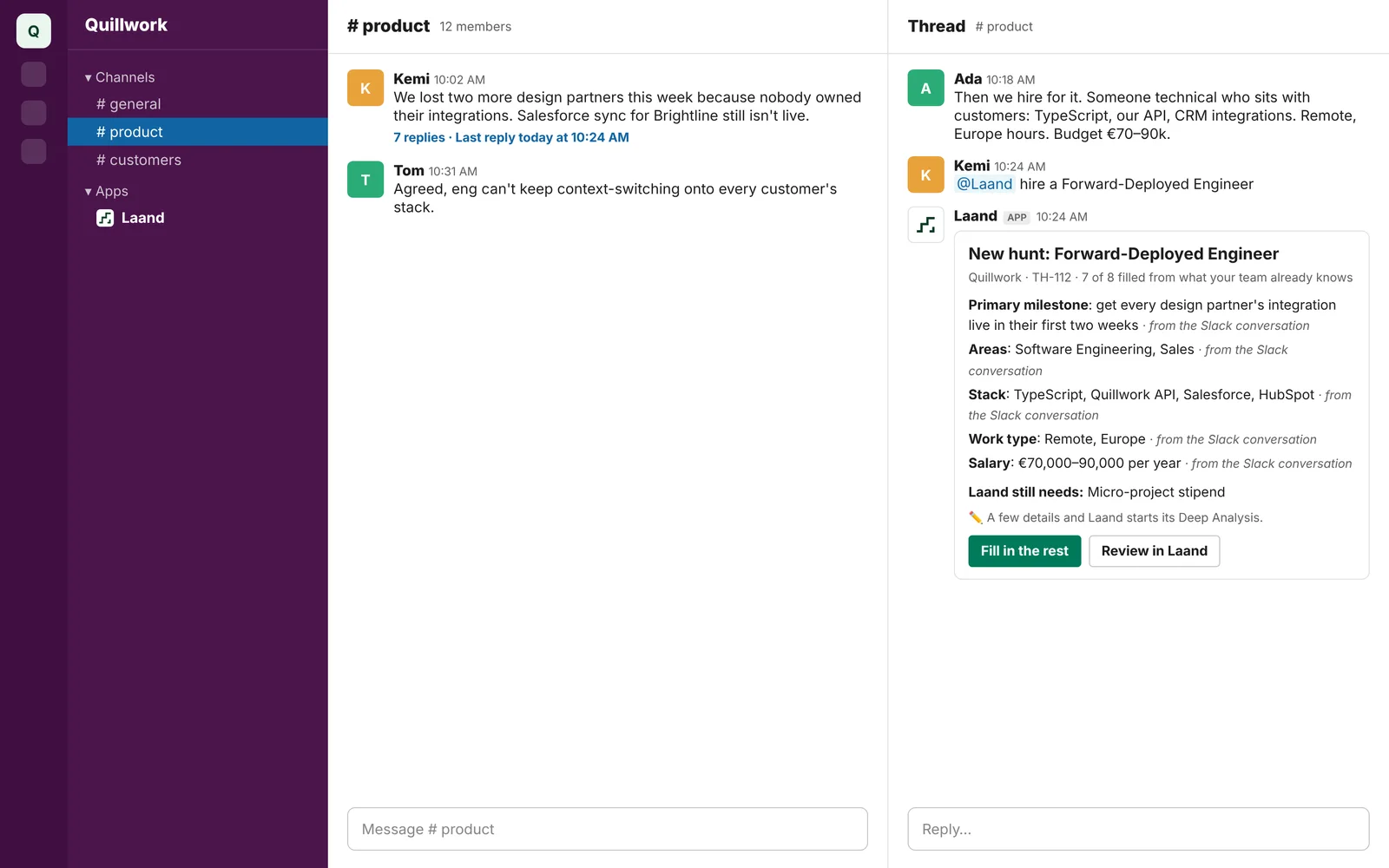
Here's how most hires at an AI startup actually begin.
It's 10:02 on a Tuesday in #product. Kemi writes: "We lost two more design partners this week. Nobody owns their integrations, and Brightline's Salesforce sync still isn't live." Ada replies sixteen minutes later: "Then we hire for it: someone technical who sits with customers. TypeScript, our API, CRM integrations. Remote, Europe hours, €70–90k."
That's the job description. It's sitting right there: the problem, the urgency, the stack, the budget, the reason it matters. Your team wrote it without trying.
And then it dies. Someone has to copy it into a doc, rewrite it as a job post, paste it into an ATS, and post it somewhere. Two weeks later the candidates live in a tool three people have logins for, the opinions live in DMs, and the thread where it all started has scrolled away.
This guide is about keeping hiring where your team already talks. You'll get a setup for running a hire in Slack on its own, the privacy rules most teams get wrong, and how to make the whole team's judgment count. Then I'll show you how Laand does it end to end: you type @Laand hire a Forward-Deployed Engineer in that thread, and the hire starts, runs and gets decided right there.
Hiring decisions never happen in hiring tools
I hired a lot at VEC Studio, for my own team and for the companies we served. In all those years, I don't remember a single real decision being made inside a hiring tool. They happened in conversations: a thread, a call, a "did you see what she sent?" The tool was where the decision got recorded, days later, if anyone remembered.
That's not a discipline problem. It's a design problem. On a small team, the people who decide are busy building, and they're in Slack. Every step you put between them and the candidate is a step where judgment gets lost.
For a seven-person AI company, that loss is expensive. Your next hire is about 13% of the company. And the trait you most need, someone who spots the problem nobody assigned and owns it, is exactly what your team is best placed to judge, together, from the work.
What the market gets wrong about "AI recruiting in Slack"
Most "AI hiring in Slack" tools do one thing: push more résumés into a channel, faster. A bot posts a new applicant; an AI summary says they have "8 years of relevant experience"; someone reacts with 👀.
That's the old pipeline with a new notification sound, and it's arriving just as the pipeline stops working:
- LinkedIn receives about 11,000 applications a minute, up 45% in a year (The New York Times, via eWeek).
- 41% of US job seekers admit to hiding prompt injections in applications to get past AI screening (Greenhouse).
- 46% of job seekers trust hiring less than a year ago, and 42% of them blame AI (same report).
And the Laand Hiring Index, built from 896,475 job descriptions, shows 79% of ads that ask for high agency ask for nothing but a résumé to prove it. Piping those résumés into Slack doesn't make them more true. The channel needs better evidence, not more of the same.
How to run a hire in Slack today (no extra tools)
If you want to do it by hand, here's the setup that works.
1. One private channel per role
#hire-fde, private, with only the people deciding. Never discuss candidates in public channels. Slack keeps what's posted, and a name, a salary expectation or a frank opinion can't be taken back.
2. Pin the brief, written from the thread
Ask Slack AI (or any assistant) to turn the original thread into a brief:
From this thread, write: the problem this hire must solve in 90 days,
what "solved" looks like, the skills it truly needs, and the budget.
Quote the messages each point comes from.
Pin it as a canvas. Every candidate gets judged against it.
3. Use a Workflow Builder form for intake
A short form with three questions beats a CV upload: What would you do first about this problem? What have you shipped that's closest to it? Link one piece of work.
4. Agree on how you vote
Write it in the channel topic: ✅ hire, 🤔 not sure, ❌ no, and always a reason in the thread. Reactions without reasons turn into the loudest voice winning.
5. Ask for real work before the first call
For the top five, send a small paid task built from the problem in your brief. Review the results in the channel, together.
6. Close the loop in the thread it started in
When you hire, say so in the original thread. It tells everyone the problem now has an owner.
Where Slack alone breaks
That setup is better than most. But on a small team, it fails in predictable places:
- Nobody sources. Slack can receive candidates; it can't find them.
- Identity arrives first. The name, photo and LinkedIn land before the work, and everything after is coloured by them.
- "Waiting on you" is invisible. A finalist's task sits unreviewed for four days because everyone assumed someone else had it.
- Money and access happen elsewhere. Paying for tasks, inviting people, checking their submissions: all off-platform, all manual.
- The record is scattered across reactions, DMs and memory.
Each of those is solved by default in Laand, without leaving Slack.
Hiring from Slack, end to end, with Laand
Step 1: Connect once
In Laand, go to Overview › Integrations › Connect Slack and approve. Each teammate links their own Slack to Laand once (/laand link), so Laand always knows who's clicking, and what they're allowed to do. People are never matched by email.
Step 2: Hire from the thread
In the thread where you decided to hire:
@Laand hire a Forward-Deployed Engineer
Laand reads the whole thread and drafts the hunt from it: the milestone, the problems, the stack, the budget, each with where it came from. Or use /laand hire <role> in any channel, and Laand reads its last 30 messages. Owners and admins can start hunts; everyone else can join in.
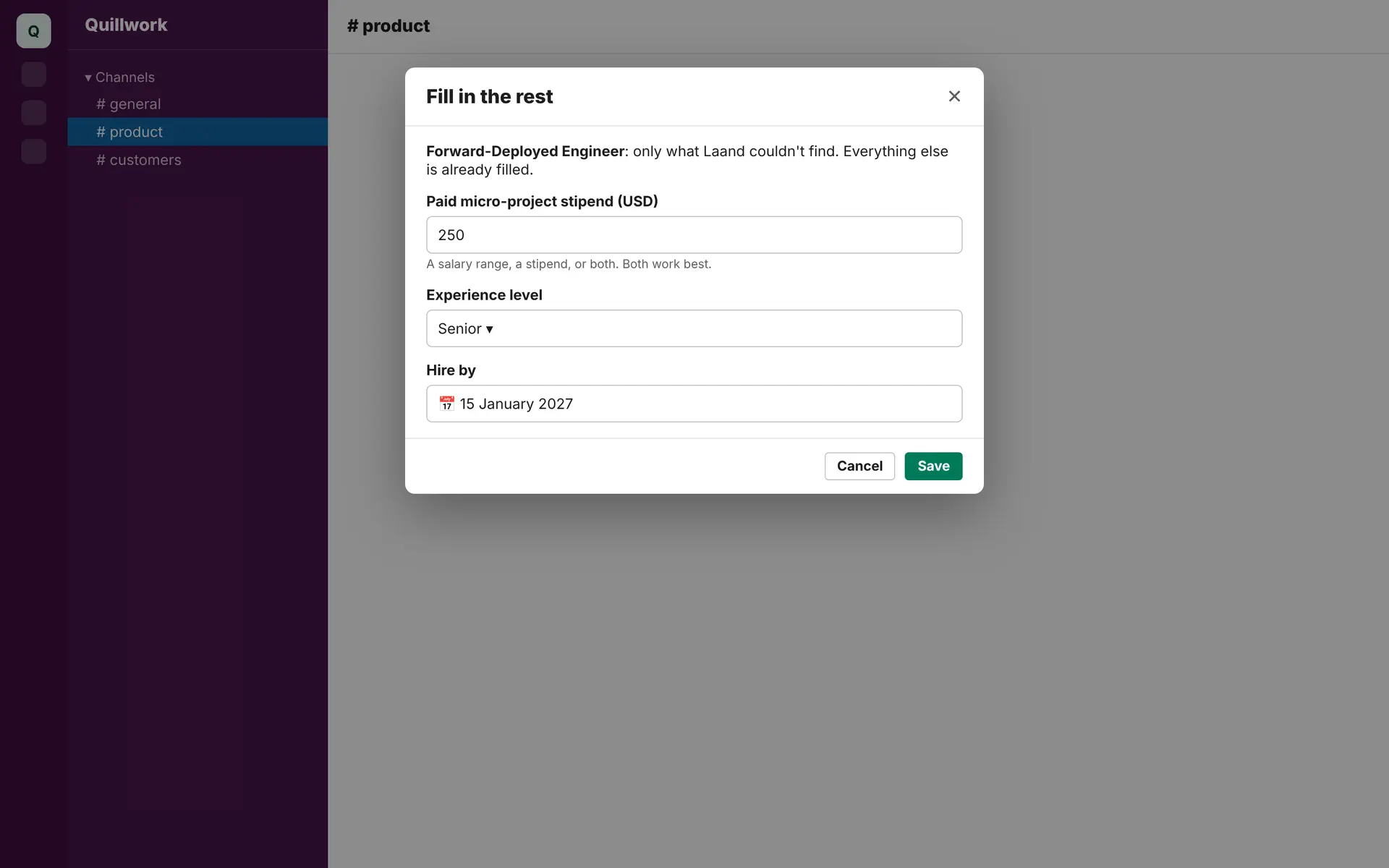
Step 3: Fill only what's missing
Laand's card says exactly what it still needs. Fill in the rest opens a form with only those fields.
Step 4: Review and publish, from the thread
Laand runs its Deep Analysis: the core problems behind the role, the High-Agency Assessment, and paid micro-projects built from your real problems. When it's ready, the card updates in place with a Publish button.
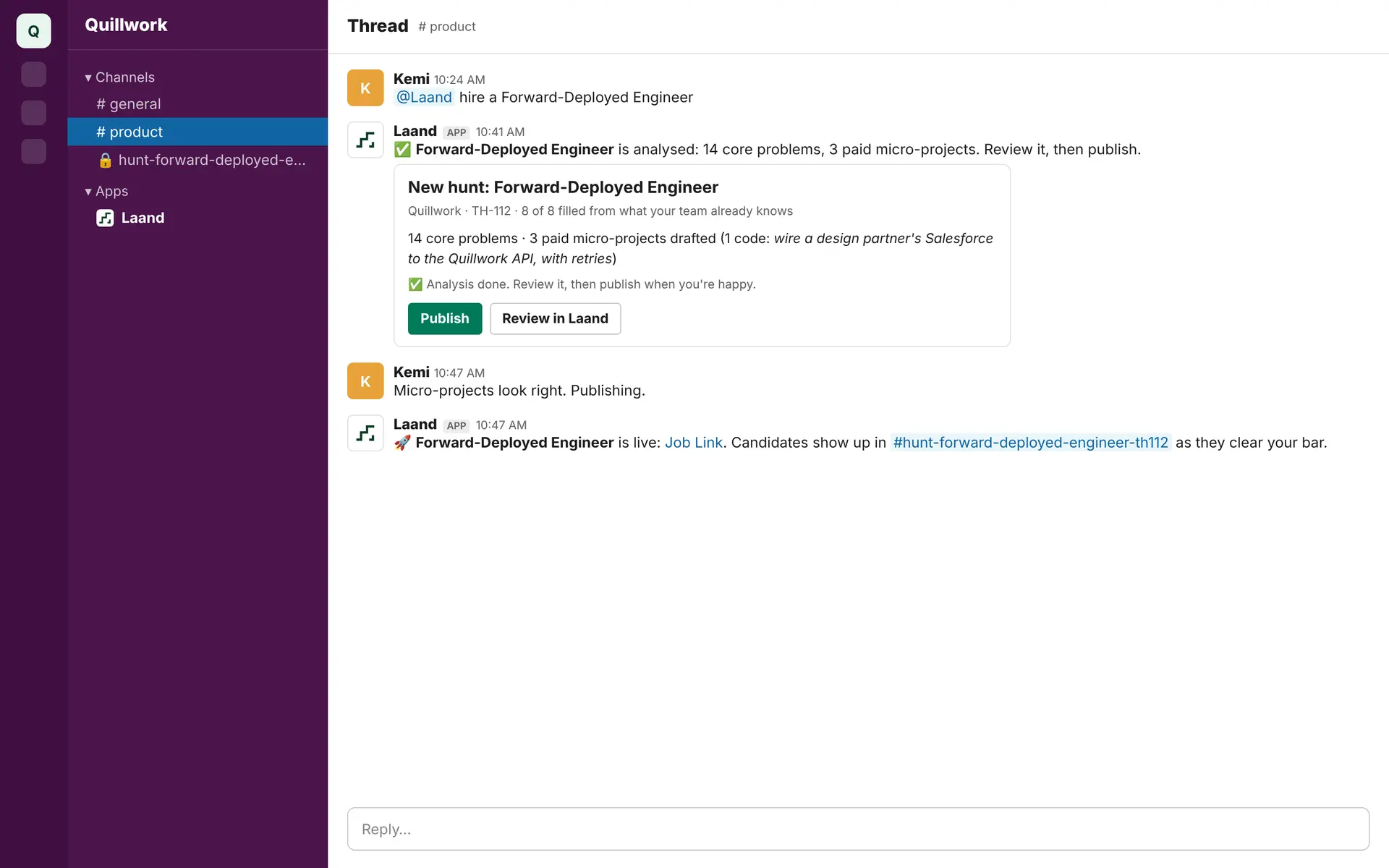
Publishing is free. The thread hears that the hunt is live, and a private hunt channel opens.
Step 5: Candidates arrive as work, not résumés
In the private hunt channel (#hunt-forward-deployed-engineer-…), a candidate only gets a card once they clear your Fit Score bar. Below it, they're a count. Each card updates in place as they move: assessment score, micro-project, hidden-test results, Laand's review, and your team's say. What happened, and who did it, goes in the card's thread.
Until you unlock someone, the card shows a made-up name and scores, never identity. That's deliberate: Slack keeps what's posted, so nothing identifying is posted before you've judged the work.
Step 6: Decide together, in the thread
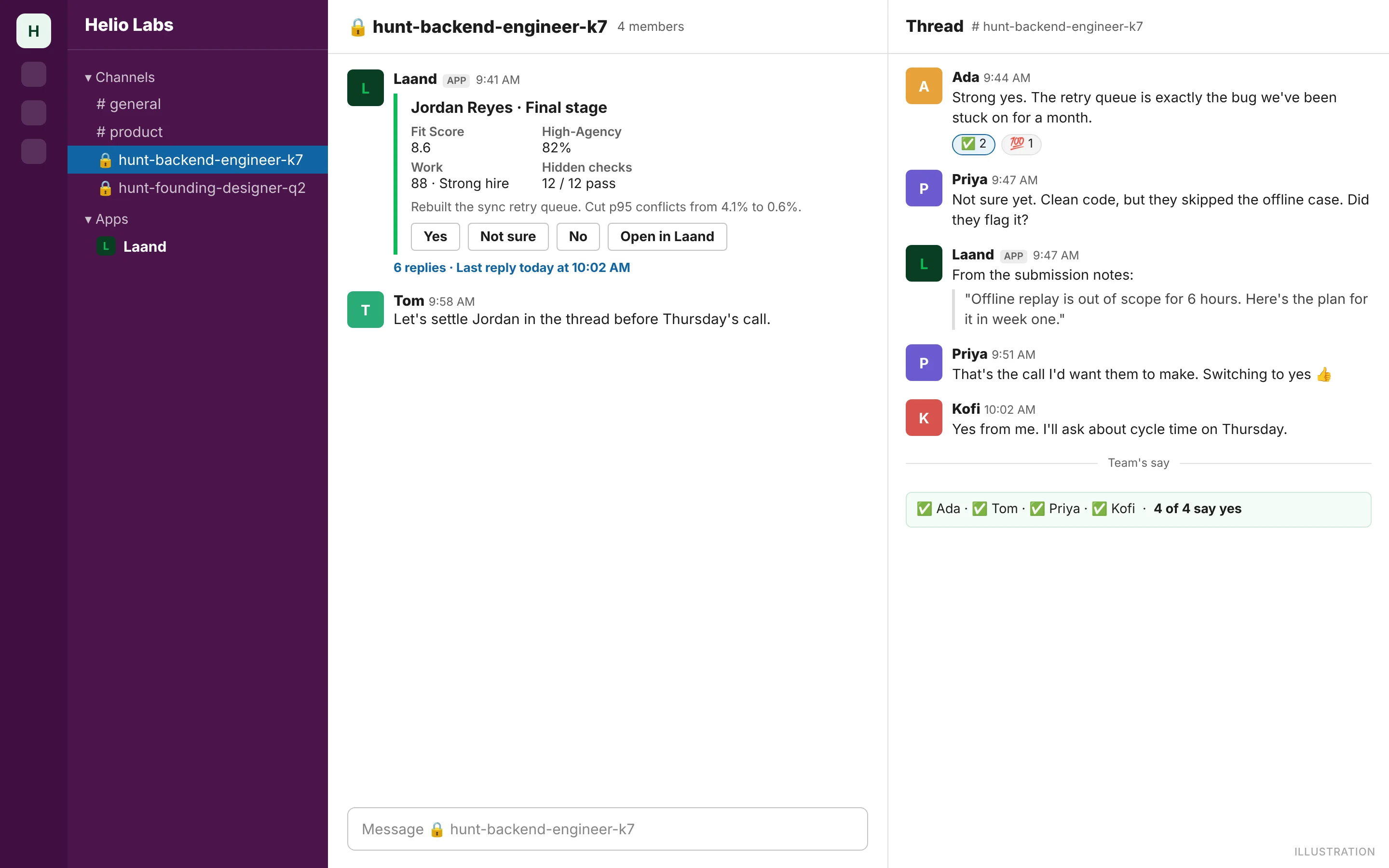
Everyone leaves their say (Yes / Not sure / No, with a note) on the card. Owners and admins can move someone to the final stage, release a micro-project stipend early, or flag it during its 48-hour hold, right from the buttons. Paying to unlock, paid invites and marking the hire stay in Laand, one click away.
Step 7: Nothing waits on you without you knowing
Laand nudges in the card's thread when something's stuck: an assessment waiting over a day, a stipend hold ending soon, work sent and not yet reviewed, a deadline coming up. /laand waiting lists everything on your plate, and the Laand tab in Slack shows every open hunt by stage.
And you can ask:
/laand ask How many people cleared the assessment for FDE this week?
Answers come from the same numbers as your dashboard.
One hire, five tools later: the real cost
The five-person team from the thread hires its Forward-Deployed Engineer at €90,000.
| Route | Cash | Where the decision actually happens | What you see first |
|---|---|---|---|
| Recruiting agency | 20–25% of salary (Dover): €18,000–€22,500 | Email threads with the recruiter | Five CVs |
| ATS with a Slack integration | Greenhouse roughly $6,000–$10,000 a year for small teams, plus a reported $2,000–$8,000 to set up; Ashby from $400/month | DMs, after a notification links you out of Slack | Résumés and AI summaries of résumés |
| Notion page + Slack channel | Free | The channel, until it scrolls away | Whatever people send, names first |
| "AI recruiter" bots | Varies: often a seat licence or a per-hire fee | A bot posting more applicants into a channel | More résumés, faster |
| Laand in Slack | Free to connect and publish. $750 per talent unlocked. Five $250 stipends ($1,250) + unlocking your top two ($1,500) = $2,750 | The thread you started in, and a private hunt channel | Real work on your problem, scored, before any name |
FAQ
Is it safe to discuss candidates in Slack? Only in private channels, and only once identity is appropriate. Laand posts cards to private hunt channels, invites only linked teammates, and keeps candidates anonymous until you unlock them.
What Slack permissions does Laand need? To read the thread or channel a hunt starts from, and to post its card there. If you'd rather not grant those, hunts can still start from the role name, and the card goes to your DMs.
Can everyone on the team use it? Yes. Everyone can follow along and leave their say. Owners and admins make decisions that commit money or move candidates.
Do we need an ATS too? Not to hire on Laand. If you have one, keep it for compliance and records; Laand handles sourcing, evidence and the team decision.
What does it cost? Connecting Slack and publishing hunts are free. $750 per talent unlocked, only for people who've already done the work.
Hire where you decided to hire
Your team already wrote the job description. It's in a thread from last Tuesday. Your team will also make the decision, in a thread, whatever tool you buy.
So start there, and end there. Let the work come to the channel, let the team judge it together, and let the person who earned it be the last thing you see, not the first.
Start a Talent Hunt · Watch how it works (2 min)
Victor Eduoh, Founder, Laand
Quillwork and its team are an illustration. Laand isn't affiliated with Slack, Salesforce, LinkedIn, Greenhouse, Ashby or any company named here. Hiring Index figures were taken on 13 November 2026; see the Index for today's. Competitor prices are from their public pages and buyer-reported figures, November 2026.
Stop applying blind.
Laand scores your fit for any role, then builds the application kit that proves you can do the job.
Join LaandStart your next hire from a Slack thread
Mention @Laand in the thread where you decided to hire. Laand drafts the hunt from the conversation, and brings the best candidates back to your team in Slack.
Start a Talent Hunt